Featured

Task 1: Learning technology critique

Augmented Reality (AR) is an integration of a virtual world into the real world. It provides additional details to a real-world place, such as an overlay of audio, graphics, and other virtual elements (Green, Green & Brown, 2017). This blog will explore the power of AR within the classroom, including the promotion of creativity and also assess the extent to which the application ‘Quiver’ utilises these capabilities. In the classroom, AR has been shown to increase intrinsic motivation as it develops student’s interests, resulting in students consolidating their learning (Billinghurst & Duenser, 2012).

An example of how to use ‘Quiver’ the app: https://www.youtube.com/watch?v=eLTo_peumis

Case study

‘Quiver’ is an example of Augmented reality that can be used in the classroom. This app allows students to colour in set pictures which they can scan, view in 360 and edit on their iPads. Some sheets, when scanned include labels and a quiz, however others only provide 3D views of an otherwise 2D colouring.

This app may benefit students, mainly in K-3 who are developing fine motor skills or revising/ starting a topic, as it is interactive and can foster student’s willingness to learn, while also nurturing their creativity. As students create their own coloured pages, they develop a sense of pride, leading to higher engagement (Bower, Howe, McCredie, Robinson & Grover, 2014). Lastly, students are able to view and interact with items that would have been difficult to see without the app, e.g. the inside of a volcano, or the components of a cell.
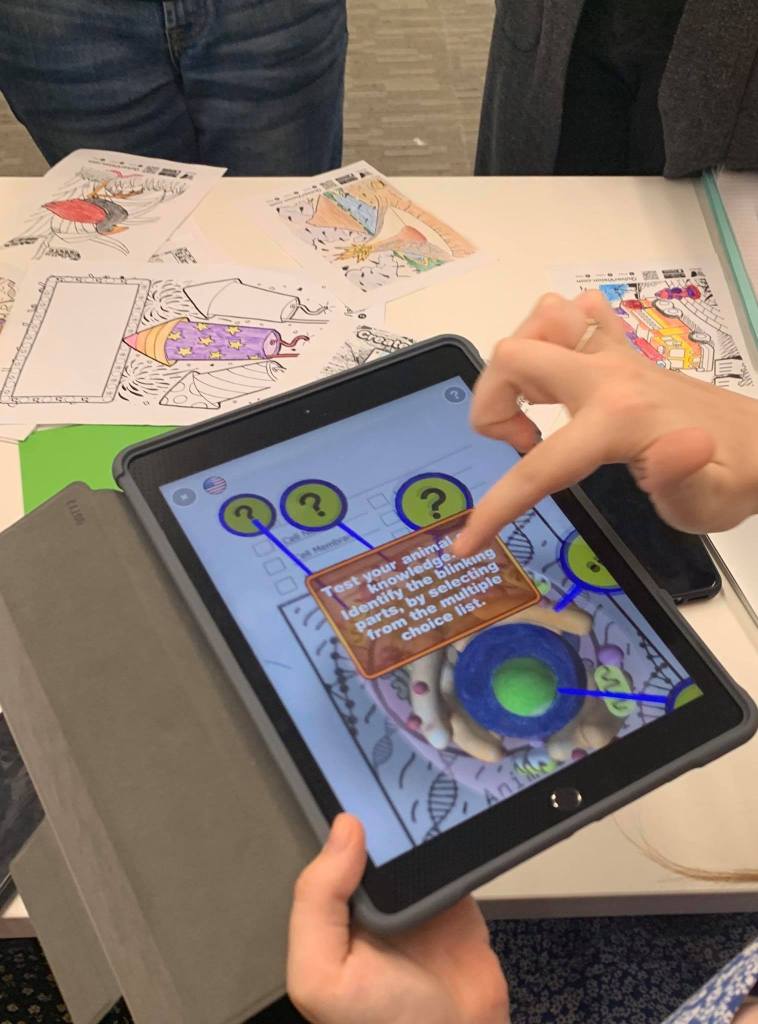
Shared image

However, a limitation of Quiver is it only works with provided sheets, so students are not given the freedom to express their creativity and design their own detailed sheets. This would have increased their empowerment and higher order thinking, as well as their creativity. It is essential for students learning to involve creativity, thus challenging them to explore their own ideas. Creativity involves exploration, risk taking and experimentation but colouring in pictures doesn’t allow students to partake in this (Bower, et al. 2014). Concurrently, these drawings do not allow for differentiation, which may develop student’s disappointment and an unwillingness to participate (Wu, Lee, Chang & Liang, 2013).

Picture taken by Blog author

‘Quiver’ could be integrated into the classroom, however, it needs extra learning tools alongside it, such as hands on interactive learning, to become a more creative learning sequence. Whilst ‘Quiver’ is limited in its capabilities and lack of room for creativity, it highlights a great potential for the future of AR in the classroom. AR can greatly benefit the classroom as students are able to interact with materials and concepts that otherwise would not have been possible due to factors such as risk. They are able to explore the world around them in new ways and engage with a large variety of subject matters without leaving the classroom, thus improving their conceptual understanding (Bower, et al., 2014).

References

Billinghurst, M., & Duenser, A. (2012). Augmented Reality in the Classroom. Computer, 45(7), 56-63.

Bower, M., Howe, C., Mccredie, N., Robinson, A., & Grover, D. (2014). Augmented Reality in education – cases, places and potentials. Educational Media International, 51(1), 1-15.

Green, Jody., Green, Tim., and Brown, Abbie. (2017). Augmented Reality in the K-12 Classroom.  TechTrends, 61(6), 603-605.

Wu, H., Lee, S., Chang, H., & Liang, J. (2013). Current status, opportunities and challenges of augmented reality in education. Computers & Education, 62(C), 41-49.
Week 9: Constructionism

Constructionism is designed to provide students with the four most important skills to succeed in the 21st century which include “critical thinking, communication, collaboration and creativity” by engaging them in meaningful experiences (Jefferson and Anderson, 2017). Makerspaces promote constructionist learning using physical materials (Stevenson et al, 2019). As stated by Sheridan et al (2014), Makerspaces are “informal sites for different types of creative production in art and science, where people blend digital and physical technologies to explore ideas and learn technical skills”. They are recognised for promoting creativity, critical thinking and problem solving through hands-on design (Stevenson et al, 2019).

Makerspaces are a transformative element in education as they promote authentic, real-world creativity through design e.g. crafting their own circuits, enabling integration of STEM learning in a motivating way (Resnick, 2014). Instructional models such as the IDEO’s Design Thinking for Educators can be used to teach makerspaces. Freeman (2017) notes that design thinking encourages the idea that failure is a vital part of learning, and makerspaces allow for the process of experimentation, as students design and build, making continuous improvements to their prototypes as they learn what works and doesn’t work.

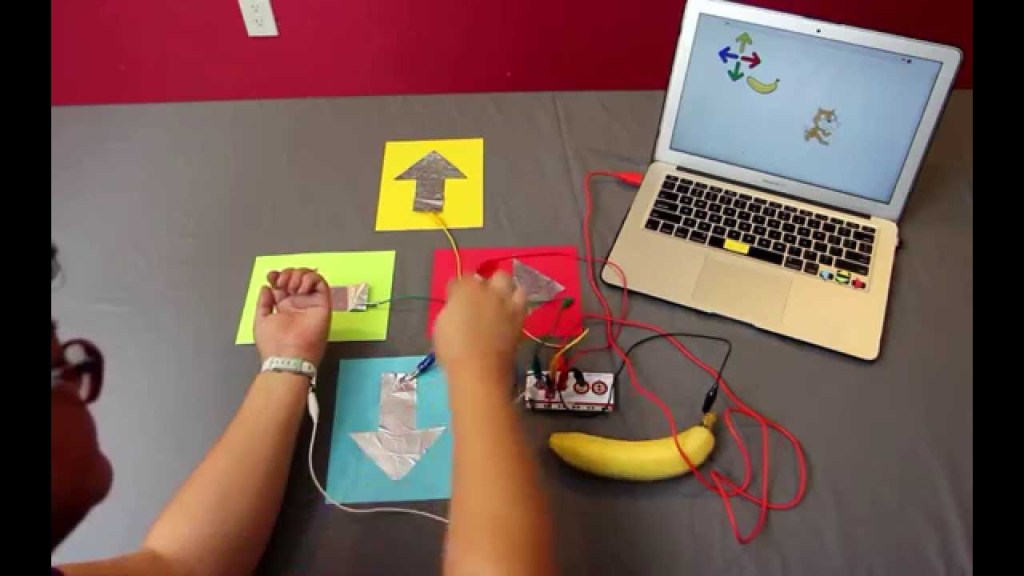
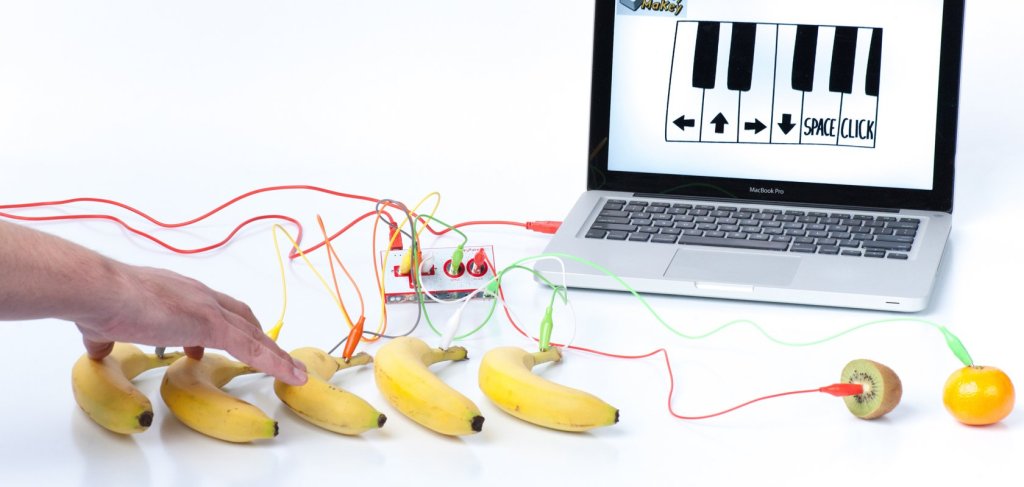
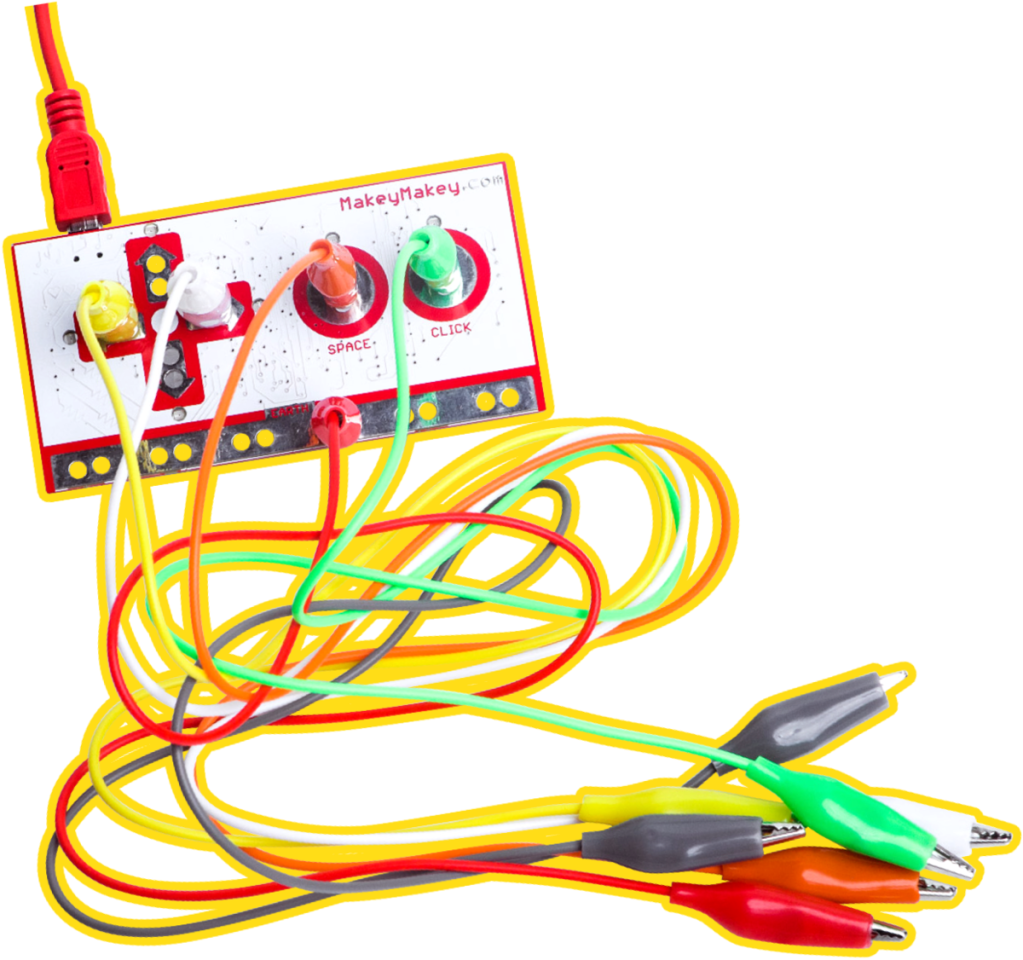
Makey Makey is an example of a Makerspace. It uses a circuit board, which is a piece of hardware featuring a microcontroller, built on a single printed circuit board that encourages critical thinking and reflection. It is best used in a primary classroom and allows students to problem solve in a student-led way. Stevenson et al (2019) states that play is the dominant support for creative thinking, which is developed while participating in construction activities. Garaigordobil and Berrueco (2011) found that structured play positively impacts verbal and visual creativity. By using Makerspaces, in particular Makey Makey, students are learning by doing and have the opportunity to share what they have made with their peers (Rivas, 2014). LittleBits is another example, that is designed for younger students that requires minimum knowledge in electronics and coding to use. Lastly, Circuit Scribe encourages students to participate in hands on learning.

The maker movement allows students to foster creativity by developing innovative solutions to authentic problems, supporting exploration and experimentation. It also links to many KLAs such as Science as students can test how to conduct electricity. Students create a path to conduct electricity, meeting the outcome SC5-11PW (NESA, 2017). Playdough is very conductive, so students can also use Playdough to learn letters with the Makerspaces, e.g. touching an orange for the computer to type O. It can also be used to create a piano! The video below highlights many ways Makey Makey’s can be used including an example of the Piano.

Accessed at: https://www.youtube.com/watch?v=rfQqh7iCcOU
This video portrays many ways a Makey Makey can be used in different inventions to do many things
Accessed at: https://www.youtube.com/watch?v=CQMyf3o-xYo

It is vital that Makerspaces are researched before being used in the classroom, as this area is rapidly evolving. Some issues as states by Stevenson et al (2019) are that it can become difficult to access equipment or gain the skills to teach Makerspaces in the classroom. Teacher’s need to be provided with support through professional experience, programming, training and resources to implement Makerspaces into their classrooms.  

References

Garaigordobil, M., & Berrueco, L. (2011). Effects of a play program on creative thinking of preschool children. The Spanish journal of psychology14(2), 608-618.

Jefferson, M., & Anderson, M. (2017). Transforming schools: Creativity, critical reflection, communication, collaboration. Bloomsbury Publishing.

NSW education standards authority (NESA). (2017). Science K-6 syllabus.

Rivas, L. (2014). Creating a classroom makerspace. Educational Horizons93(1), 25-26.

Sheridan, K., Halverson, E. R., Litts, B., Brahms, L., Jacobs-Priebe, L., & Owens, T. (2014). Learning in the making: A comparative case study of three makerspaces. Harvard Educational Review84(4), 505-531.

Stevenson, M., Bower, M., Falloon, G., Forbes, A., & Hatzigianni, M. (2019). By design: Professional learning ecologies to develop primary school teachers’ makerspaces pedagogical capabilities. British Journal of Educational Technology50(3), 1260-1274.

Week 8: Games-based learning – GameMaker

Games-based learning involves students learning using concepts in games. Students learn through repetition, failure and accomplishing their goals, as they are provided with the opportunity to test different ways to create and complete games (Gee, 2005). Productive failure is a part of games-based learning, as students are allowed to make mistakes. Productive failure is vital to a student’s development as they begin to understand how to persevere and also afford better conceptual understanding and creative thinking (Kapur, 2016).

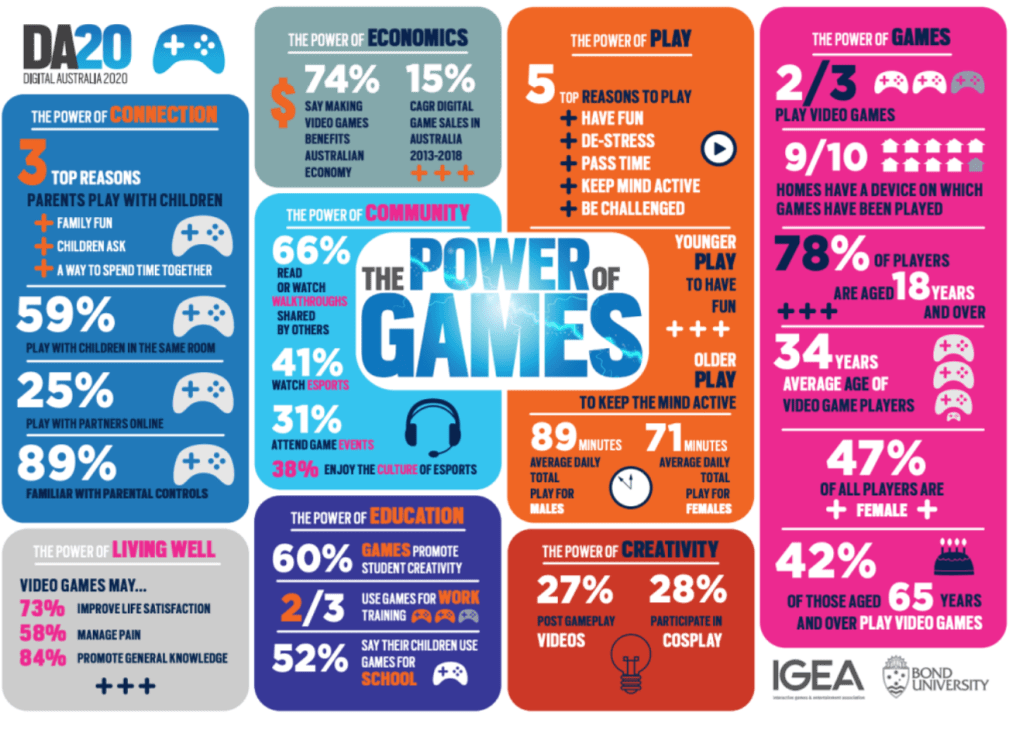
A report by Digital Australia 2020, detailing the power of games. Accessed at: http://igea.net/2019/07/digital-australia-2020-da20

As stated by Perera et al. (2014) gamed-based learning is used to provide an intervention for students struggling to understand material, as it provides an alternative avenue for learning. It is used to enrich students learning by adding text, audio and images into an active environment. It is also used to reinforce the curriculum content. Some curriculum content that can be taught using games-based learning includes all areas of Mathematics, using the game Prodigy, which comprises a story and battle area. One syllabus outcome that could be covered using Prodigy is MAe-2WM.

The use of games is an excellent way to support constructivist pedagogy through students engaging in hands on learning and being active participants, instead of passive listeners. Many types of games e.g. role play, enable learning through problem-solving and enquiry. Open-ended exercises are used as students program the game to be uniquely their own, while also inspiring students to explore different avenues. Using GameMaker by Yoyo games allows students to gain 21st century skills, that include teamwork, as they are working with their peers to design a game, persistence when they encounter parts of the game that do not go as planned, and critical thinking as they develop an understanding of how to create a game (Gee, 2005). Scratch also allows students to learn 21st century skills such as coding and creativity as they are coding what they want to create.

A GameMaker game created by blog maker Hannah Billington. The aim is to touch the flag item at the end without hitting any of the objects flying around the screen

GameMaker allows students to become designers by providing them with a platform to work their creative mind and innovate, while also mastering skills and competencies. Students need to plan, design, test and produce when creating a game (Federoff, 2002). By testing their games, students are able to recognise problems in their games and fix these by coming up with creative solutions. This provides students with a sense of accomplishment as they have created a challenging but not impossible game, while also fostering creativity as they have solved problems, brainstormed and directed and designed their own games (Connolly et al. 2006).

Tutorial on how to use GameMaker for children, from the link: https://youtu.be/aG06Y_jQkrc

When looking at the affordances of using emerging technologies in the classroom, teacher’s must be able to recognise the issues that may arise. Games-based learning does not always support deeper learning e.g. games created to teach such as Mathletics, may not allow student’s the opportunity to foster creativity and solve problems, as they are simply being passive recipients, or rote learning (Connolly et al. 2006). Therefore, teachers must ensure the process relates to syllabus outcomes and includes assessment, to guarantee students are gaining a deeper understanding of the content.

References

Connolly, T. M., Stansfield, M., & McLellan, E. (2006). Using an Online Games-Based Learning Approach to Teach Database Design Concepts. Electronic Journal of e-learning4(1), 103-110.

Gee, J. P. (2005). Good video games and good learning. Phi Kappa Phi Forum, 85(2), 33-37.

Kapur, M. (2016). Examining productive failure, productive success, unproductive failure, and unproductive success in learning. Educational Psychologist51(2), 289-299.

Perera, N. T., Wijerathne, I. S., Wijesooriya, M. M., Dharmarathne, A., & Weerasinghe, R. (2014). A game-based learning approach to enrich the special education in Sri Lanka. ICTer7(2).

Week 7: Virtual Reality – CoSpaces

Virtual reality (VR) is a three-dimensional, computer generated virtual environment that allows users to act in a fully immersed, real-time simulation (Southgate,2018). This blog will explore the power of VR in the classroom, including its ability to promote creativity, raise curiosity and engage students in becoming active learners, placing the power learning in their hands. It also transforms the teaching of educational content, as it enables students to not only see the content, but interact with it, bringing the lesson to life and increasing engagement (Southgate, 2018). Teachers have the ability to take students on field trips, to places that otherwise wouldn’t have been possible due to cost, danger, or time period. Students can visit other planets, or visit ancient Greece using VR (Freina and Ott, 2015). This is important as it empowers students to explore, extend and enrich their learning while fully immersing themselves in the experience, increasing intrinsic motivation and promoting empathy (Dede, 2009).

This is a video of my CoSpaces environment that I created
Attached is the QR code to access my CoSpaces
https://apps.apple.com/au/app/cospaces-edu/id1224622426 – This is the link to download the app!

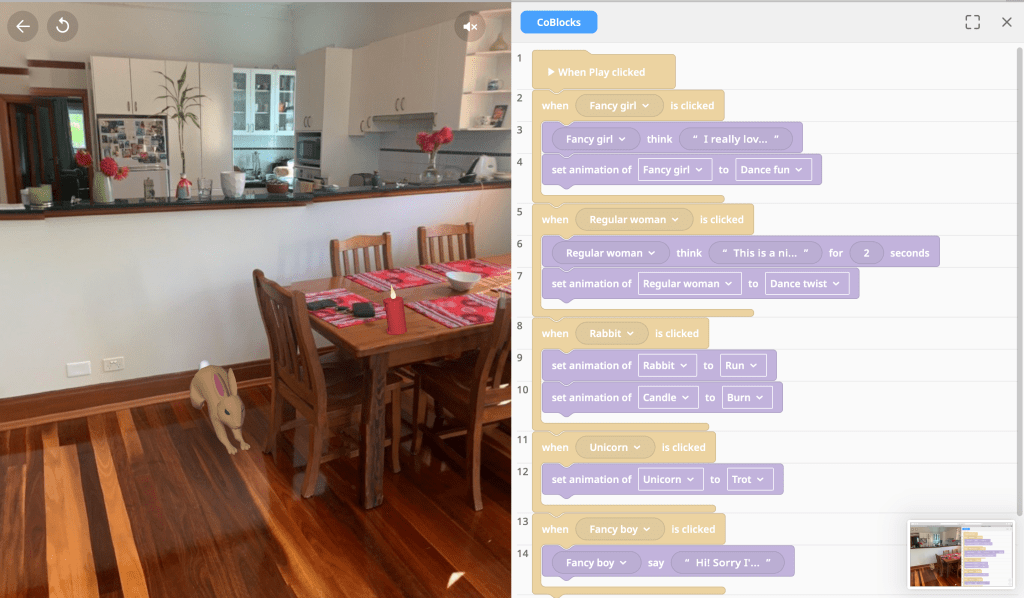
CoSpaces is an online platform, where users create 3D environments that can be viewed on a screen or in VR, using Google cardboard. This offers students ample opportunities to express their creativity, as they’re able to design the background, add sound, images, objects (people, furniture) and their own designs, promoting higher order thinking. Coding is another functionality of CoSpaces, called CoBlocks, that allows students to further their coding capabilities by enabling their objects to move or talk. Anne Frank’s house can also be on VR, where student’s are able to experience this house using Oculus VR googles.

As users have almost limitless boundaries using CoSpaces, their designs can be as creative as their mind is creative. They could build a house on the moon or design a landscape for their pet unicorns. CoSpaces can incorporate many KLAs, including English, where students could write a creative writing piece detailing the adventures their characters pursue, in their VR environments (Outcome code: En2-10C) (NESA, 2012).

A screenshot of my coding using CoBlocks on the CoSpaces website

There are however challenges when implementing VR. These include the cost of VR technology, as the average cost of a headsets is $400, however less expensive headsets like Google cardboard are being released (Freina and Ott, 2015). These will allow more schools to implement VR in their classrooms. Another issue is both the students and teachers need to be trained in ways to properly implement the technology, which can take further time out of the lesson. Lastly, an issue in relation to health, is students are present in the virtual environment without a ‘reality check’, so students may become motion sick, as there is no real-world experience (Davis, 2014). Students aged 2-12 are the most susceptible to cybersickness, therefore using VR technology in the classroom for too long may increase student’s likelihood of feeling physical discomfort (Davis, 2014).

Despite these limitations, VR has the potential to radically transform education, if used correctly. However, more studies and research need to be undertaken, if VR is to be used more effectively, for promoting creativity, collaboration and deep learning.

References

Davis, S., Nesbitt, K., & Nalivaiko, E. (2014, December). A systematic review of cybersickness. In Proceedings of the 2014 Conference on Interactive Entertainment, (pp. 1-9). ACM.

Dede, C. (2009). Immersive interfaces for engagement and learning. science, 323(5910), 66-69

Freina, L., & Ott, M. (2015). A literature review on immersive virtual reality in education: State of the art and perspectives. In The International Scientific Conference eLearning and Software for Education (Vol. 1, p. 133). National Defence University.

NESA – NSW education standards authority. (2012). English K-10 syllabus.

Southgate, E. (2018). Immersive virtual reality, children and school education: A literature review for teachers.

Week 6: Augmented reality – Froggipedia

Augmented reality is the addition of a computer-assisted contextual layer of information over the real world, creating an enhanced reality (Kapp & Balkun, 2011). Pokémon Go which overlays characters into the world around the user is an example of AR. Augmented Reality has the capacity to greatly influence students learning in the classroom, by promoting a creative learning environment where they are able to discover and submerge themselves in experiences, usually beyond their physical reach. An example of this could be conducting hazardous science experiments without fear of being harmed (Siegle, 2019). AR allows students to play with and model 3D objects on a screen. It also allows students to learn and innovate, increase their knowledge retention and reduce their cognitive load (Mehta, 2012).

Case study

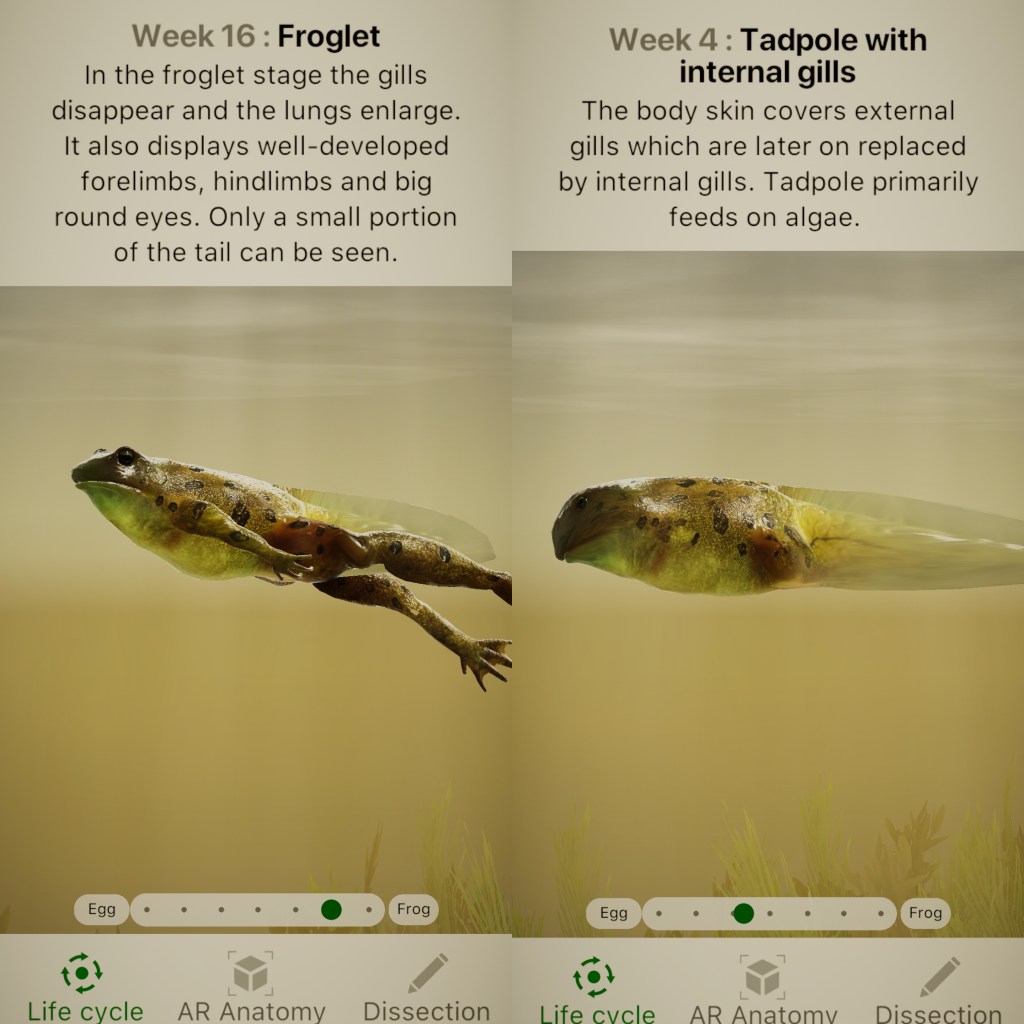
‘Froggipedia’ is one example of AR that can be used in the classroom. It allows students to observe and interact in a frog’s life cycle. Students are able to place a real frog on their desk and explore the frog’s systems e.g. muscular, skeletal and digestive (Siegle, 2019). There is a dissection feature where students can dissect the frog without mess but with the same results, the app even alerts the user when they aren’t being careful with the scalpel. It is an interactive and simple way to engage students in the science syllabus e.g. outcome “ST2-4LW-S “compares features and characteristics of living and non-living things”. This app allows students to learn through “inquiry-based learning” as students manipulate the frog on their screen and help foster their creativity through collaboration by sharing insights with peers (Bower, 2014).

This video is found at: https://www.youtube.com/watch?v=MhI49AefyJY
It is a promo video which details all the different features of ‘Froggipedia’

However, there are some weaknesses of using ‘Froggipedia’ which include the lack of species variety, as there is only one species of frogs to be explored. This doesn’t represent the anatomy or life cycle of other species of frogs. Additionally, frogs are the only animal that can be explored and for students to have a detailed understanding of a life cycle/dissection, this app should include the ability to explore other animals, which may limit student’s creativity. Teachers need to be equipped with the skills to use these new apps, so they can teach students innovatively and also problem solve when there are technological difficulties, ensuring the class does not spend too much time learning how to use the app, rather than actually interacting with it. ‘Sandbox’ is another AR design that schools can use to teach KLAS. It allows students to explore the concept of erosion without leaving the classroom.

This is a collage I made of parts of the AR technology that I used

AR apps can have many benefits in the classroom, as the apps enable students to create interactive products that demonstrate and enhance their learning. They are able to engage with a variety of subject matters and as well as interact with the environment without actually leaving the classroom. Such a resource is invaluable to schools that may lack resources but with these apps they are able to more than compensate for this, providing students with a world of exploration and discovery.

References

Bower, M., Howe, C., Mccredie, N., Robinson, A., & Grover, D. (2014). Augmented Reality in education – cases, places and potentials. Educational Media International, 51(1), 1-15.

Kapp, C., & Balkun, M. M. (2011). Teaching on the virtuality continuum: Augmented reality in the classroom. Transformations: The Journal of Inclusive Scholarship and Pedagogy22(1), 100-113.

Mehta, V. (2012). Restructuring 2D Objects in 3D World Using Augmented Reality-Based Future Classroom. IUP Journal of Computer Sciences6(2).

Siegle, D. (2019). Seeing Is Believing: Using Virtual and Augmented Reality to Enhance Student Learning. Gifted Child Today42(1), 46-52.

Week 5: Robotics – Beebots

For many years Robotics have engaged students and moved them to another level of understanding and learning. There are further developments being made which will expand opportunities for a new generation of learners. These new innovations have the potential to transform the classrooms pedagogical approaches, but they need to be used appropriately and innovatively to capture student’s attention and excite further discovery. Robotics incorporates machinery that is programmed by a computer to perform specific tasks. It allows students to participate in scenarios which wouldn’t have been possible before (Alimisis, 2012).

An example of Robotics in the classroom is Bee-bots, which are engaging objects that foster creativity due to their functionality, development of student’s exploration, problem solving and decision-making abilities. Bee-bots can be programmed via a tablet to move 40 steps, by using forward, backward, left and right turn arrows, which allows students to experiment as they create their own design by directing the bee-bot where to go. Bee-bots are easy to use compared to other robotic equipment, so are designed for younger students as an introduction to robotics and learning the basics of programming (Attard, 2012).

A short online video of younger learning partaking in mathematics in the classroom through the use of Bee-bots
Link: https://www.youtube.com/watch?v=za6wHl50fJU

Bee-bots play an integral part in teaching syllabus outcomes to student’s as they can help develop language, literacy and numeracy skills (Alimisis, 2012). Bee-bots can be used in Mathematics to teach Length, for example using the syllabus outcome MA1-9MG: measures, records, compares and estimates lengths…. (NESA, 2017). Alternatively, for older students, students in Stage 3 could use the Bee-bot technology to “select and use the appropriate device to measure lengths and distances…” (MA3-9MG). By using Bee-bots in the classroom, the teacher takes on a constructivist view of teaching, providing group learning activities where students are active learners who discover through hands on learning (Alimisis, 2012). They are also given opportunities to create their own solutions to problems and then reflect on their skills and collaboration (Highfield, 2010).

This is my attempt at using the Bee-bot emulator online. The link to the emulator is: https://www.terrapinlogo.com/emu/beebot.html
I uploaded this to youtube: https://www.youtube.com/watch?v=HDBFZSFn4Ss&feature=youtu.be

As Bee-bots caters for younger students, Robots such as Lego WeDo can foster the learning capabilities of older students, developing their skills in the areas of in-depth programming, creative thinking and utilising higher order thinking skills by building on prior knowledge. Lego WeDo allows students to design and code their own robot to interact in a Lego construction.

There are some limitations when using robotics, specifically bee-bots in the classroom, including distraction, when students become more excited by the use of new technology, shifting the focus of the lesson to technology rather than fulfilling syllabus outcomes. Another limitation includes lack of training for teachers who may not be aware of the affordances of using robotics. However, all of these limitations can be overcome, and Robotics has and will continue to be an exciting way to encourage learning and engagement in the classroom.

References:

Alimisis, D. (2012). Robotics in Education & Education in Robotics: Shifting Focus from Technology to Pedagogy. Robotics in Education Conference, 2012

Attard, C. (2012). Teaching with technology: exploring the use of robotics to teach mathematics: robots, once the providence of science fiction are now part of the classroom. Catherine Attard explains how to evaluate their use. Australian Primary Mathematics Classroom17(2), 31-33.

Highfield, K. (2010). Robotic toys as a catalyst for mathematical problem solving.

NESA (2017). Science and Technology K-6 Syllabus. Available at: https://educationstandards.nsw.edu.au/wps/portal/nesa/k-10/learning-areas/mathematics/mathematics-k-10

Week 4: Computational thinking – Blockly

Computational thinking is a problem-solving process (Wing, 2006). It includes analysing, organising data, interpreting patterns, implementing algorithms and breaking down each step to solve a problem, so that a computer, or human can implement an effective solution (NESA, 2017). This blog post will explore the potential of computational thinking in the classroom, and focus on the case study ‘Blockly’, which can be implemented to teach students computational thinking while also fostering creativity.

Blockly is a library of games that allow the user to build a code that runs them. Students are exposed to the fundamentals of coding, including conditionals, loops, equations, functions and code-based language (Morgan, 2014).

Case study

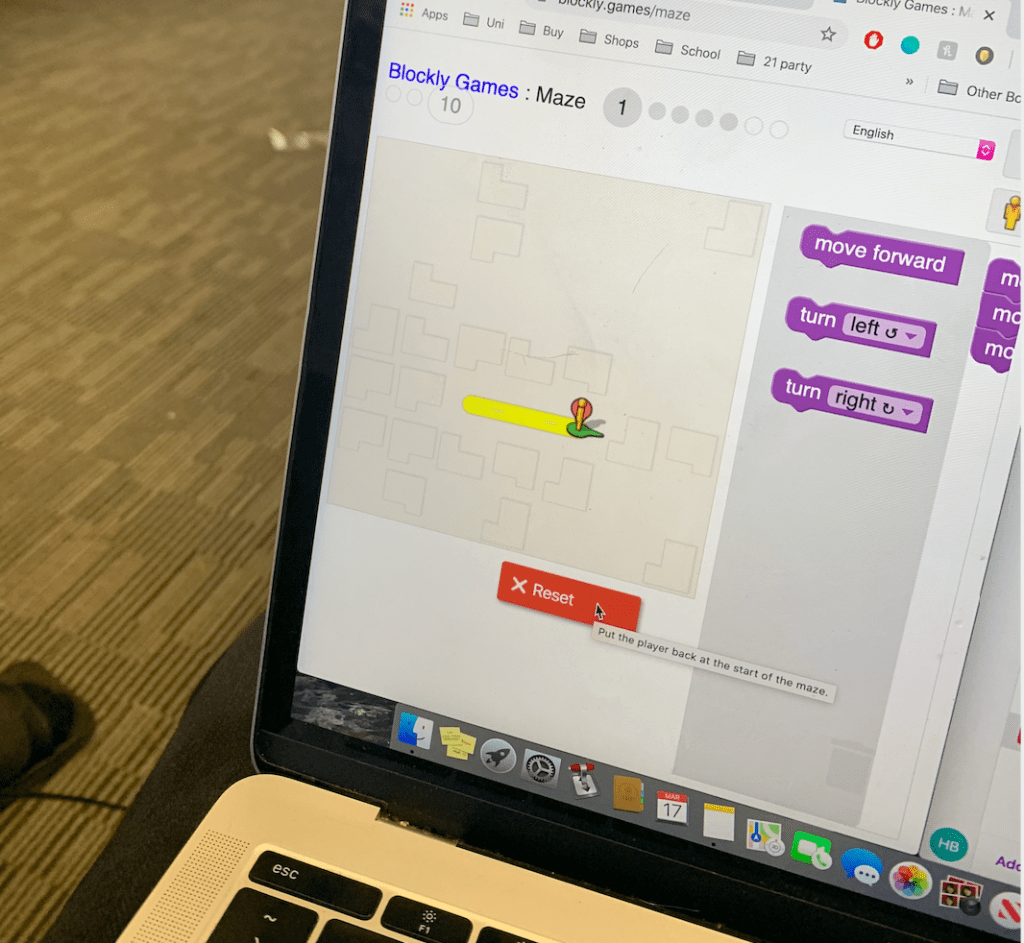
One game that runs on the blockly site is ‘Maze’. Students are given levels of mazes to navigate their character through, by developing their own codes. Each level becomes more complex as students begin to develop the basic skills needed for coding.

An example of how to code ‘Blockly’ the app: https://www.youtube.com/watch?v=eLTo_peumis

Blockly can be used in the classroom to develop students computational thinking gradually through challenging students, while also fostering creativity as students develop skills as they find their own ways to progress through levels. Using blockly helps students develop higher order thinking skills such as analysing, implementing algorithms and breaking down problems, which are also transferable skills that can be applied to other knowledge areas (KLAs) and used in everyday life (Hsu, 2018). This would be useful in a Maths class as Blockly could be used to encourage students to use their new problem-solving skills to create and solve a digital algorithm. By learning these skills, students become active participants, more confident in their abilities, leading to higher self-esteem (Lawrence, 2006).

Picture taken by Blog author

However, Blockly has its limitations. Students are not able to create their own solutions to the levels, as there is only one answer, reducing the freedom of creativity. It also has limited power once student’s arrive at certain levels as these levels may become too difficult to overcome, even with the teacher’s help. Blockly can also be quite difficult to navigate for students in the earlier stages. There are other websites that have utilised Blockly JavaScript coding in a more user-friendly way that can implement creativity more effectively, for example, micro:bit. This programme allows the user to implement their own solutions to create a game like scissors, paper, rock.

Both of these technologies need to firstly be modelled and scaffolded, then as students become more familiar with the technologies, the teacher is then able to guide students when necessary until students are able to interact with these technologies alone. Overall, these technologies would both work well together in a classroom to learn computational skills, and link to other KLAs, by using a hands-on approach to learning.  

References:

Hsu, T. C., Chang, S. C., & Hung, Y. T. (2018). How to learn and how to teach computational thinking: Suggestions based on a review of the literature. Computers & Education, 126, 296-310.

Lawrence, D. (2006). Enhancing self-esteem in the classroom. Pine Forge Press.

Morgan, N. (2014). JavaScript for kids: A playful introduction to programming. No Starch Press.

NESA (2017). Science and Technology K-6 Syllabus. Available at: http://educationstandards.nsw.edu.au/wps/portal/nesa/k-10/learning-areas/technologies/science-and-technology-k-6-new-syllabus

Wing, J. M. (2006). Computational thinking. Communications of the ACM49(3), 33-35. Available from: http://dl.acm.org.simsrad.net.ocs.mq.edu.au/citation.cfm?doid=1118178.1118215

Week 3: Design based thinking – 3D printing

Creativity is a foundation for students to develop their problem-solving skills. Design education is one way that teachers can foster student’s creativity (Wong & Siu, 2011). Design based thinking includes fundamental thinking skills which can be used in everyday life and need to be engaged with, if learning is to be authentic as well as instructional. These include analytic, practical, creative, critical and divergent thinking skills (Sternberg, 2006). There are five stages of the design process that are vital for understanding in learning, which include discovery, interpretation, ideation, experimentation and evolution (IDEO, 2012).

3D printing is one tool that encourages the student to engage a number of these skills. 3D printing allows the user to create a three-dimensional item from a digital creation. It is both interactive and engaging for the students as it offers them an opportunity to create and construct their own designs, while also experimenting and learning from their errors, which fosters creativity (Wong & Siu, 2011). Depending on a student’s level of understanding, they have the ability to create a model from scratch, or use a scaffold which can be provided, thus providing differentiation within the classroom. They are powerful machines that can be used in a variety of KLAs, include Maths and Science, to create shapes and models and in the Creative Arts to design individualised projects (Makino, et al., 2018). Tinkercad is one example of a website where students are able to design an object to be printed. Tinkercad is an easily operated app that lets you design using shapes on a blank page which can be 3D printed.

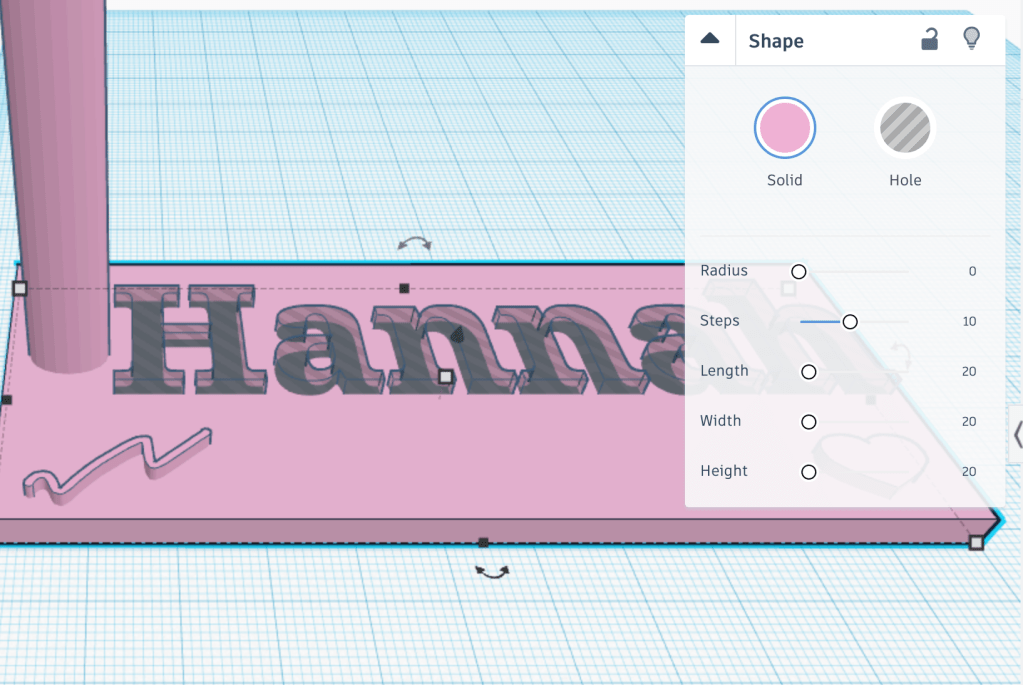
A name tag I created while using Tinkercad

There are some limitations of using 3D printers in the classroom. 3D printers are expensive, meaning there is an inequality between students/schools who can and cannot access this technology. The teacher’s role in the classroom is also vital to facilitate learning, and they need extensive training and knowledge on how to use a 3D printer (Stevenson, et al., 2019). They also need to be confident and willing to use and model the 3D printer in the classroom, as some teachers may be worried about their own level of understanding and therefore not use the printers to their full capacity. In this case, using applications that are easily operated, such as ‘Sketchlot’, to interact with design thinking may be more appropriate. If teachers use this technology the right way, they will inspire a classroom of students and create a learning environment that is not only instructional but inspirational (Lenoir, 2006).

3D printers in the classroom can either engage students, or distract them, as they become excited or disengaged, so it is fundamental that students are provided with scaffolding and skills to utilise the equipment to its fullest potential. 

References

IDEO (2012). Design Thinking for Educators (2nd Edition)

Lenoir, N. (2006). Biotechnology, Bioethics and Law: Europe’s 21st Century Challenge. The Modern Law Review, 69(1), 1-6

Makino, M., Suzui, K., Takamatsu, K., Shiratori, A., Saito, A., Sakai, K., and Furukawa, H. (2018). 3D printing of police whistles for STEM education. Microsyst Technol 24, 745-748.

Sternberg, R. J. (2006). The nature of creativity. Creativity research journal, 18(1), 87.

Stevenson, M., Bower, M., Falloon, G., Forbes, A., & Hatzigianni, M. (2019). By design: Professional learning ecologies to develop primary school teachers’ makerspaces pedagogical capabilities. British Journal of Educational Technology, 50(3), 1260-1274.

Wong, Y., & Siu, L. (2012). A model of creative design process for fostering creativity of students in design education. International Journal of Technology and Design Education, 22(4), 437-450.

Design a site like this with WordPress.com
Get started